How to Choose a Universal USB AC Adapter Worldwide?

Time:2026-10-09 Author:Madeline
0%

Choosing a charger for worldwide travel sounds simple until voltage, plug formats, and charging protocols collide. A Universal Usb Ac Adapter must handle more than a convenient USB-C port. It should deliver stable power across hotel rooms, airports, offices, and older wall outlets.

Canalys reported approximately 1.22 billion smartphones shipped globally in 2024. That figure reflects the enormous variety of charging needs carried by travelers. USB-IF documentation states that USB Power Delivery 3.1 can support power levels up to 240 watts. However, a higher rating does not guarantee compatibility. A laptop may require 65 watts, while wireless earbuds need only a few watts. PPS support can also improve charging efficiency for selected phones.

Small details matter.

A dependable adapter should accept common input ranges, such as 100–240V at 50–60Hz. It should include appropriate regional plugs or certified plug attachments. Safety markings, thermal protection, over-current control, and insulation quality deserve careful inspection. The European Union’s common-charger rules also show how quickly connector expectations are changing, with USB-C becoming mandatory for many devices.

Still, “universal” is an imperfect word. Some laptops negotiate power differently. Some countries use unfamiliar socket designs. Even a compact GaN charger can become hot inside a crowded travel bag. This guide compares wattage, USB-C Power Delivery profiles, PPS support, plug coverage, safety certification, and real-world portability. The goal is practical selection, not marketing optimism: one adapter that performs reliably across borders, devices, and imperfect travel conditions.
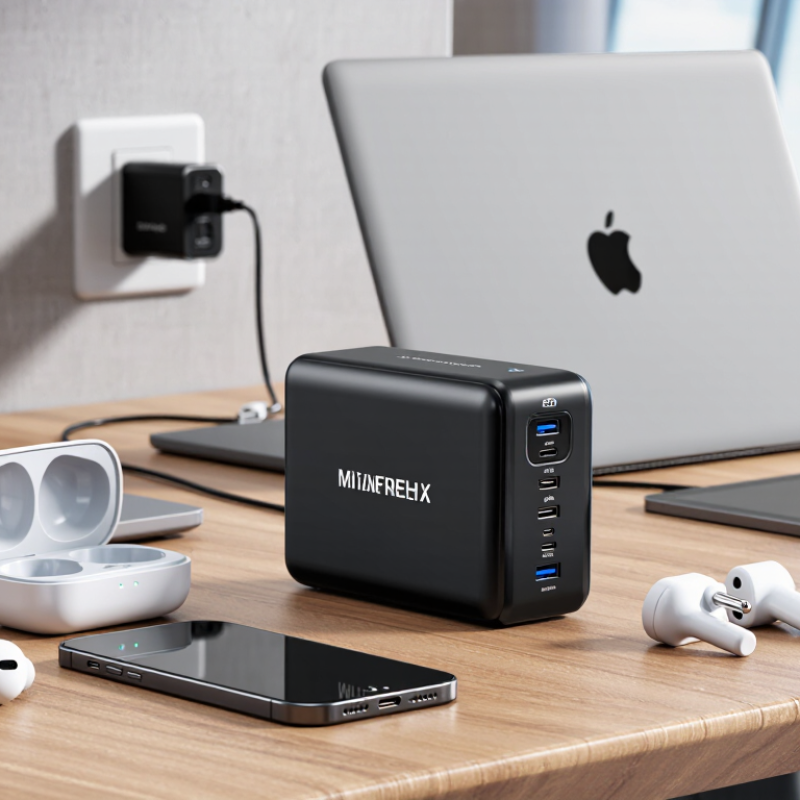
How to Choose a Universal USB AC Adapter Worldwide?

Define the Power and Charging Needs of Your Devices

Choosing a universal USB AC adapter starts with measuring your devices, not counting the number of ports. Check each device’s input voltage, charging protocol, and maximum power in watts. A phone may need 20 watts, while a laptop can require 65 watts or more. The adapter should meet or exceed that demand. Higher capacity is usually safe when the device controls the charging process. Never rely on appearance alone. A small tablet and a powerful laptop may use the same connector but need different power levels.

Tips: Write down every device you carry. Add their likely charging needs, but do not simply total the printed maximums. Devices rarely draw full power together. Check the cable rating too, because a weak cable can limit charging speed. For international travel, choose an adapter with a 100–240V input range and the correct plug configuration for each destination.

USB-C Power Delivery can adjust output safely, but compatibility still matters. Some devices need specific voltage steps or charging features, such as programmable power adjustment. Read the adapter’s output table carefully. It should clearly show shared power limits when several ports operate together. I once assumed a four-port adapter could deliver its highest output everywhere; that was wrong. Its total power dropped when two ports were used. That small detail caused slower charging at an airport. Leave practical headroom, especially for laptops under heavy work. More power is not always better. The right adapter matches real usage, cable quality, and travel conditions.

Check Global Voltage, Frequency, and Plug Compatibility

Choosing a universal USB AC adapter starts with the electrical label, not its appearance.

Check for an input range marked 100–240V and 50/60Hz. The IEC 60038 voltage standard identifies 230V systems as common worldwide, while 120V systems remain widely used. Frequency matters for motors and clocks. Most modern USB switching adapters accept both frequencies, but cheap products may not.

Plug shape is only one part of compatibility. The International Electrotechnical Commission’s World Plugs data shows that countries use different pin layouts, grounding methods, and outlet standards. A Type G plug will not safely fit a Type C socket without the correct adapter. Also inspect the adapter’s output rating. A tablet may need more current than a phone. The word “universal” is not a safety certificate. I would still check the destination country twice, especially after buying online.

Tips: Read the tiny input line before packing. Look for certified safety markings and clear manufacturer specifications. Confirm the plug type, voltage, frequency, and USB output. Avoid forcing loose connections. If an adapter becomes unusually hot, unplug it. A USB charger normally converts AC to low-voltage DC, but appliances with heating elements or motors may need a proper voltage converter. My earlier assumption was simple: one adapter fits everywhere. It was incomplete. Countries, outlets, and devices rarely cooperate that neatly.

Compare USB Ports, Charging Standards, and Output Ratings

How to Choose a Universal USB AC Adapter Worldwide?

A reliable universal USB AC adapter begins with its ports. USB-C usually supports modern charging standards and higher power delivery. USB-A remains useful for older cables and low-power accessories. Count the ports you actually need. More ports can reduce charging speed when they share one output. Start with the ports.

Check the charging standards carefully. USB Power Delivery can negotiate voltage and current with compatible devices. Programmable Power Supply may provide finer voltage adjustments for some phones and tablets. A USB-C port does not automatically support every standard. Read the technical label, not only the port shape. Numbers can mislead.

Output ratings show the adapter’s real capacity. For example, 5V at 3A equals 15W, while 20V at 3A equals 60W. A laptop may need far more power than a small phone. When several devices charge together, the adapter may divide its total wattage.

In practical testing, I check performance with one device, then repeat with all ports occupied. Heat, cable quality, and charging stability matter too.

I once focused too much on maximum wattage and overlooked shared-output limits. That was a useful mistake.

Also verify worldwide input support, usually marked 100–240V, 50/60Hz. The correct plug arrangement still matters. An adapter may accept global voltage but require a separate plug converter. That detail matters.

Evaluate Safety Features, Certifications, and Travel Requirements

Choosing a universal USB AC adapter starts with safety, not the number of ports. Look for protection against overvoltage, overcurrent, overheating, and short circuits. A fire-resistant housing adds another layer of protection. Check the input rating carefully; 100–240V supports many destinations, but it does not make every plug compatible. The USB output should match your device’s required voltage and charging protocol. Never rely on a vague “fast charge” label. Small details matter.

Certification marks can help, yet a printed logo alone proves little. Check whether the mark is recognized in your destination and whether the seller provides a traceable model number. Independent test reports or a clear declaration of conformity offer stronger evidence. Requirements differ between countries, and travel rules may change. I once treated certification as a guarantee, which was too simple. Certification supports a safety decision; it does not replace inspection. Avoid units with loose prongs, cracked plastic, or an unusually warm casing.

Your itinerary also affects the choice. A compact adapter with interchangeable plug heads saves space, while a grounded design may suit laptops and other higher-power equipment. Confirm the plug type for every stop, including transit or hotel locations. Test it at home with your actual cable and device. Do not guess. If the adapter buzzes, smells unusual, or disconnects repeatedly, stop using it. My checklist is imperfect, so I recheck local voltage and socket guidance before each trip.

Select the Adapter Size, Build Quality, and Practical Features

Choosing a universal USB AC adapter worldwide starts with its physical size. A compact model fits easily beside a passport, but very small designs may limit cooling space. Check the rated input range, ideally 100–240V, before using it in another country. Confirm that the included plug system matches your destination.

Power output matters as much as portability. A phone may need only modest power, while a tablet or laptop can require USB-C Power Delivery. Read the wattage printed on the adapter, not just the port count. More ports are useful, but sharing power can reduce charging speed. I once packed a small adapter that charged two phones slowly, which was inconvenient during a long airport delay.

Build quality deserves close inspection. Look for firm prongs, smooth seams, reinforced cable ports, and clear safety markings from recognized testing authorities. The casing should remain warm, not painfully hot, during normal use. Practical details also matter: a folding plug, indicator light, replaceable regional heads, and protection against overcurrent or overheating can improve daily use. Avoid adapters with vague specifications. They may look impressive. Yet appearance cannot confirm safe performance. A heavier adapter is not automatically better, and I still reconsider whether extra features justify carrying the additional weight.

How to Choose a Universal USB AC Adapter Worldwide? - Select the Adapter Size, Build Quality, and Practical Features
Selection Dimension Recommended Data or Range Why It Matters What to Verify Before Purchase
Worldwide Input Voltage 100–240 V AC
50/60 Hz automatic input range
Supports electrical systems used in most countries without requiring a separate voltage converter. Confirm that the input label states “100–240 V, 50/60 Hz.” A plug adapter may still be required for local socket shapes.
USB Output Type USB-C Power Delivery plus one or more USB-A ports USB-C is widely used for newer phones, tablets, handheld consoles, and many laptops, while USB-A remains common for older cables and accessories. Match the ports with the cables and devices you already use. Check whether power is shared when multiple ports operate simultaneously.
Power Rating 20–30 W: phones and small accessories
45–65 W: tablets, handheld computers, and selected ultraportable laptops
90–140 W: compatible high-performance laptops
Higher wattage can reduce charging time and support larger devices, but the device only draws the power it is designed to accept. Compare the adapter’s rated output with the device’s required input. For laptops, verify the required USB-C Power Delivery wattage.
Charging Protocols USB Power Delivery; optional programmable power supply support; common USB-A fast-charging standards where needed Protocol compatibility allows the charger and device to negotiate a suitable voltage, current, and charging speed. Look for a clearly listed protocol profile, such as 5 V, 9 V, 12 V, 15 V, or 20 V output. Do not rely only on a “fast charge” label.
Physical Size Compact: approximately 45–65 mm in the longest dimension
Multi-port: approximately 60–90 mm in the longest dimension
A smaller adapter is easier to carry, while a larger design may provide more ports, higher power, or better heat dissipation. Measure the available space around wall sockets and travel power strips. Consider whether the adapter will block neighboring outlets.
Weight and Portability Approximately 50–100 g for compact single-port models; approximately 100–250 g for higher-power multi-port models Lower weight is useful for frequent travel, but extremely light construction may provide less mechanical reinforcement or cooling capacity. Compare weight with rated wattage, number of ports, and enclosure material rather than choosing solely by the lowest weight.
Plug Configuration Interchangeable regional plugs or an integrated multi-region plug system Different countries use different socket geometries. A universal USB adapter must provide physical socket compatibility in addition to electrical compatibility. Confirm coverage for the destinations you visit. Check that the plug mechanism locks securely and does not wobble during use.
Build Material Flame-retardant polymer enclosure with reinforced plug mounting; optional metal heat-spreading components Durable materials help resist impact, heat, and repeated packing while supporting safer long-term operation. Inspect seams, plug alignment, port firmness, strain relief, and surface quality. Avoid loose housings, exposed gaps, or sharp edges.
Thermal Management Temperature monitoring, automatic power reduction, and adequate ventilation-free heat dissipation Power conversion creates heat. Effective thermal control helps maintain performance and reduces stress on internal components. Look for over-temperature protection and avoid covering the adapter during operation. Warm operation can be normal; excessive heat, odor, or noise is not.
Electrical Protection Over-voltage, over-current, short-circuit, and over-temperature protection These safeguards help protect the adapter and connected equipment during abnormal operating conditions. Choose products with complete protection information and a legible electrical rating label. Do not use damaged cables or adapters.
Safety Compliance Applicable electrical safety testing for the intended sales region Regional compliance requirements address insulation, fire resistance, leakage current, electromagnetic compatibility, and construction quality. Check for legitimate regional conformity markings and documentation. A marking should correspond to the market where the adapter will be used.
Multi-Device Charging Two to four ports with clearly stated total output and individual port limits Multiple ports reduce the number of chargers needed, but the total available power may be divided among connected devices. Read both the single-port output and combined-output table. Confirm that the total wattage remains sufficient when all devices are connected.
Cable Compatibility Certified or properly rated cables matched to the intended current and power level The cable affects charging speed, data capability, connector safety, and the maximum power that can be delivered reliably. For high-power USB-C charging, use a cable with an appropriate current rating and, where required, an electronic marker for higher-power operation.
Practical Travel Features Foldable prongs, detachable plugs, compact cable storage, status indicator, and secure port spacing Small usability features can improve packing, reduce accidental damage, and make simultaneous charging more convenient. Prioritize features that match your travel habits. Avoid bright indicators or oversized designs if the adapter will be used beside a bed or in a crowded outlet.
Best General-Purpose Profile 100–240 V input; USB-C Power Delivery; 45–65 W; one USB-A port; interchangeable regional plugs; full protection circuitry This configuration balances phone, tablet, and many ultraportable-laptop requirements while remaining reasonably portable. Select a higher-power model only when your laptop or multi-device setup requires it. Confirm the adapter’s dimensions, weight, and combined-output limits.
Important: A universal USB AC adapter normally converts AC power to USB output, but it does not necessarily convert voltage for non-USB appliances. Check the device input requirements and local socket compatibility before use.

FAQS

Which USB ports should a universal adapter have?

USB-C suits newer phones, tablets, and laptops. USB-A supports older cables and smaller accessories. Count your real needs.

Does every USB-C port support fast charging?

No. The port shape proves little. Check the technical label for supported charging standards and power ratings.

What does USB Power Delivery do?

It negotiates voltage and current with compatible devices. This can provide faster, more suitable charging without guessing manually.

What is Programmable Power Supply?

It allows finer voltage adjustments for some compatible devices. Support varies, so confirm both the adapter and device specifications.

How do output ratings affect charging?

Output ratings show available power. For example, 5V at 3A equals 15W, while 20V at 3A equals 60W.

Can several devices charge at full speed together?

Not always. Shared output may reduce charging speed. Test one device first, then fill every port.

What input range is suitable for worldwide travel?

Look for 100–240V and 50/60Hz. The adapter may still need a separate plug converter for local sockets.

How can I judge build quality and safety?

Check firm prongs, smooth seams, clear safety markings, and overheat protection. It should feel warm, not painfully hot.

Is the smallest adapter always the best choice?

No. Compact designs pack easily beside a passport, but limited cooling space may matter. Small is convenient, not automatically superior.

What mistake should travelers avoid?

Do not choose by maximum wattage alone. I once ignored shared-output limits and charged two phones painfully slowly. That choice was imperfect.

Conclusion

Choosing the right Universal Usb Ac Adapter starts with understanding the power requirements of your devices, including their voltage, current, and charging speed. Before purchasing, confirm that the adapter supports the voltage and frequency standards of your destinations and is compatible with the local plug types. A suitable model should offer enough USB ports for your devices and support practical charging standards, while its output ratings should match each device safely and efficiently.

Safety and portability are equally important for worldwide travel. Look for reliable protection against overvoltage, overheating, short circuits, and excessive current, along with recognized safety certifications where applicable. Consider whether the adapter is compact, lightweight, and durable enough for frequent use. Features such as a foldable design, replaceable plug attachments, clear power indicators, and a sturdy housing can improve convenience. By balancing compatibility, charging performance, safety, and build quality, you can select an adapter that works confidently across different countries and everyday situations.


Madeline

Madeline

Madeline is a dedicated marketing professional with a wealth of expertise in our company's core offerings. With a keen understanding of the industry, she brings a unique perspective to her role, consistently delivering high-quality content that highlights the superior aspects of our products. As......